Clipshelf local-first ยท windows

You already record everything.
Finding it again is the hard part.

Clipshelf sits on the four hours you recorded last Tuesday and turns them into something you can actually walk back into โ€” chaptered by what you were playing, marked where things happened, and searchable by what was said.

A Clipshelf timeline: four game chapters across one night, event markers and match spans.
one night, 99 minutes ยท four games detected on their own ยท kills, goals and marks pinned ยท match spans derived
0:00record

Nothing changes about how you record

OBS writes one long file, the way it already does. Clipshelf reads the folder โ€” it never asks you to record differently, and it never touches the original.

While you play it notices which game is running and marks the timeline. Games that report their own events get more: kills, goals, rounds, match boundaries, pinned to the second.

0:37capture

One key, no decisions

Press the hotkey and OBS's replay buffer lands on the shelf, tagged with the game โ€” however far back you have it set. Thirty seconds if you want the kill; two minutes if you want the whole round. That's all the keypress does. Where the clip starts is not a question you should be answering mid-fight.

No replay buffer running? It falls back to cutting the moment out of the recording once the session ends, so the key still works either way.

Afterwards you open the shelf, scrub, drag the in and out points, name it, keep it. Or clear the whole night in one pass with the keyboard.

The shelf: four captures waiting, each tagged with its game.
the shelf ยท captures waiting ยท j/k to move, i and o to trim, enter to keep
1:24find

Six weeks later, one phrase

Every session is transcribed on your own machine โ€” GPU if you have one, CPU if you don't. Type something you remember saying and land on the second you said it.

This is the part that turns a folder of 20 GB files into an archive. Not the clipping. The clipping was always easy.

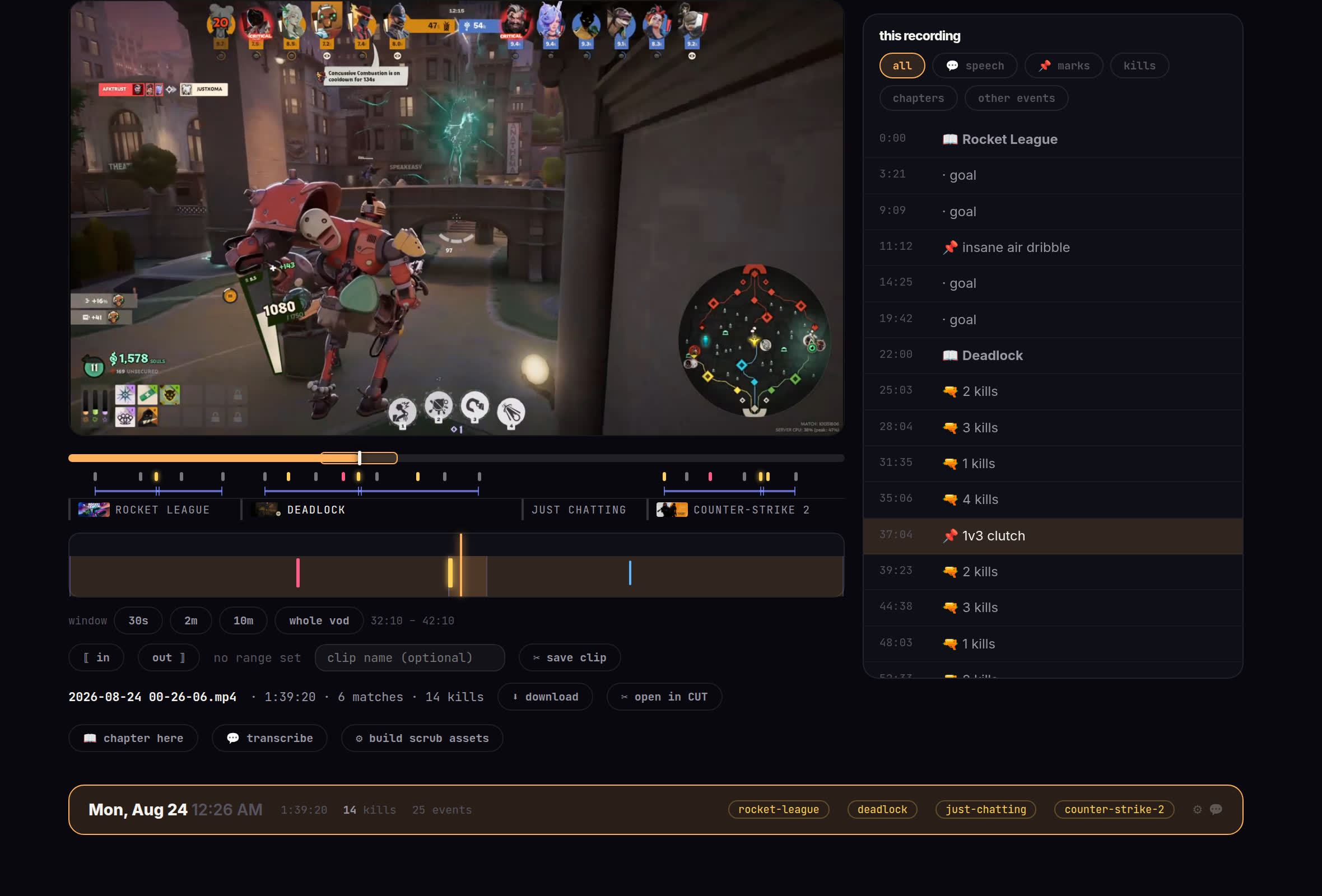
Clipshelf open on one night: the player, the chaptered timeline, and an index of everything that happened down the side.
one recording open ยท the index on the right lists every chapter, kill and mark, and speech search puts its hits in the same place ยท click anything to jump there
1:58cut & share

Then it's a clip

Trim on the shelf for something quick, or open the editor for something that needs captions, sound, multiple tracks. It renders locally at full quality โ€” no queue, no upload, no watermark, no ceiling on resolution because someone else is paying for the encode.

Sharing is optional and per-clip. You get a link that unfurls properly in Discord, or you point it at your own storage and skip us completely.

  • Game integrations are drop-in folders. Write one for a game nobody covered, or teach the vision scanners your own name.
  • No account to use the app, nothing phones home with your library, and the recordings never leave the machine unless you share one.
โ€”get it

Download

Windows 10 or 11, 64-bit. The installer carries its own Python and fetches ffmpeg the first time it runs, so there is nothing to install before it โ€” it reads your OBS profile to find the recordings folder and walks you through the rest.

version 0.1.11 ยท installs for you alone, no administrator prompt ยท uninstalling leaves your library where it is
not code-signed yet, so SmartScreen warns once โ€” More info, then Run anyway
the portable zip needs Python 3.11+ and ffmpeg on PATH ยท every build

This is an early build. It works and it's tested, but you're among the first people running it on hardware that isn't the author's. When something breaks, Settings โ†’ Problems has a copy-diagnostics button that produces a paste-able report with no paths or tokens in it.